

Description
Download Trello Chrome App – Trello App for Windows, Mac, Linux, Chrome OS
Overview
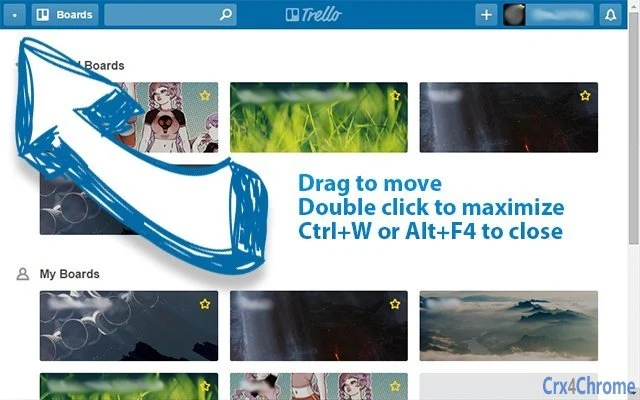
The Trello Chrome App is a lightweight desktop application designed to streamline access to Trello boards, offering a focused, frameless interface that enhances productivity for users who rely on Trello for task and project management. Built as a Chrome App, it operates independently of the browser, providing a dedicated experience similar to a native desktop application. The app eliminates visual clutter by removing the standard browser window frame, allowing users to interact with Trello in a minimalistic, distraction-free environment.
It is ideal for professionals, remote teams, and individuals managing multiple projects who value quick access and seamless navigation. The app supports core Trello functions such as viewing boards, managing cards, and handling attachments, with specific updates enhancing usability over time. For example, the ability to download attachments was added in September 2015, improving file accessibility. The developer, technobulka, has maintained transparency by publishing the source code on GitHub, enabling users to verify the app’s integrity and confirm the absence of data logging or tracking mechanisms.
Real-world usage scenarios include daily task tracking, agile team workflows, and personal planning. Users can launch the app directly from the desktop, use standard keyboard shortcuts like Ctrl+W to close or Ctrl+R to reload, and switch between windowed and frameless modes using Ctrl+Shift+F. This makes it suitable for users who prefer a streamlined, browser-embedded experience without the overhead of a full browser session.
Key Features & Capabilities
- Frameless Window Interface – The app removes the default browser window frame, offering a clean, minimal design that reduces visual distractions. This allows users to focus solely on their Trello boards without interface clutter.
- Native Keyboard Shortcuts – Full support for standard Chrome shortcuts such as Ctrl+W to close, Ctrl+R to reload, and Alt+F4 for immediate exit. These familiar controls improve efficiency and reduce the learning curve.
- Window Mode Toggle – Users can switch between frameless and standard windowed modes using the Ctrl+Shift+F hotkey, providing flexibility based on workflow needs.
- Fullscreen Support – Pressing F11 activates fullscreen mode, ideal for immersive project review or team presentations.
- Attachment Management – The app allows users to download attachments directly from Trello cards, a feature introduced in September 2015 to improve file handling.
- Source Code Transparency – The full source code is publicly available on GitHub, enabling users to audit the app and verify it does not collect or transmit user data.
These features collectively enhance usability for individuals and teams who use Trello as a central hub for collaboration. The frameless design is particularly beneficial in multi-monitor setups, where minimal window borders help maintain workspace clarity. The ability to toggle window modes ensures compatibility with both focused and open workspace preferences.
User Interface, Workflow & Performance
The user interface of the Trello Chrome App is intentionally simple and consistent with Chrome App design principles. It presents Trello content directly within a minimal window, without browser toolbars, address bars, or navigation controls. This streamlined layout ensures users remain focused on their boards and cards.
Navigating the app is intuitive, relying on familiar keyboard shortcuts and standard Trello interactions. Users can switch between boards, drag and drop cards, and manage tasks using the same methods as in the web version. The workflow is efficient for daily use, especially for those already accustomed to Trello’s interface.
Performance details were not specified by the developer. However, as a Chrome App built on web technologies, it leverages the Chrome runtime for execution, which generally ensures stable operation. The app’s lightweight size of 12.5 MB suggests minimal resource consumption. The developer did not provide additional system requirements or performance benchmarks, so exact CPU or RAM behavior remains unspecified. Stability is presumed based on the app’s long-standing functionality and consistent updates since its initial release.
Compatibility & System Requirements
The Trello Chrome App is compatible with Windows, Mac, Linux, and Chrome OS, making it accessible across major desktop platforms. It is designed to run on systems that support Chrome Apps, which requires the Chrome browser to be installed and up to date.
The application has a file size of 12.5 MB, indicating a compact footprint suitable for devices with limited storage. The developer did not specify exact hardware requirements, such as minimum RAM or processor speed. Compatibility information was partially provided, with no mention of specific OS versions beyond the general platforms.
Users should ensure their system meets the requirements for running Chrome, as the app relies on the Chrome runtime environment. The app’s reliance on Chrome means it may not function on systems without a compatible Chrome installation.
Pros and Cons
Pros
- Lightweight design with only 12.5 MB installation size
- Frameless interface reduces visual distractions
- Full support for standard Chrome keyboard shortcuts
- Source code is publicly available for transparency
- Supports multiple platforms: Windows, Mac, Linux, and Chrome OS
- Allows direct download of Trello attachments
- Free to download and use
Cons
- Requires Chrome browser to be installed and running
- No official updates since 2015, potentially limiting compatibility with newer systems
- Limited to Chrome App environment, not a native desktop application
- Exact performance metrics not provided
- Some older issues, like focus loss on Alt+Tab, were reported but not fully resolved
FAQ Section
Is the Trello Chrome App secure?
The app does not contain any logger or data grabber. The source code is publicly available on GitHub, allowing users to verify its integrity and confirm that no user data is collected or transmitted.
Can I use this app on Windows, Mac, and Linux?
Yes, the Trello Chrome App is compatible with Windows, Mac, Linux, and Chrome OS, provided the Chrome browser is installed and up to date.
Does the app require an internet connection?
Yes, since the app is a web-based interface for Trello, it requires a stable internet connection to access and sync data with Trello’s servers.
How do I update the app?
Updates are managed automatically through the Chrome Web Store. However, the last update was released in 2015, so the app may not receive future updates.
Is the app free to use?
Yes, the Trello Chrome App is completely free to download and use without any licensing fees or subscription requirements.
Final Thoughts + CTA
The Trello Chrome App offers a clean, efficient way to access Trello without the distractions of a full browser. Its frameless design, keyboard shortcut support, and transparency through open-source code make it a compelling choice for users seeking a focused workflow. While the app hasn’t seen updates since 2015, its core functionality remains intact and reliable for those who value simplicity and privacy.
It is best suited for individuals and teams already invested in Trello who want a lightweight, distraction-free desktop experience. Despite its age, the app continues to serve its purpose effectively, especially for users on Windows, Mac, Linux, or Chrome OS.
Download Trello Chrome App now to experience a streamlined, secure way to manage your projects.
Guides & Tutorials for Trello External Window App for Chrome
How to install Trello External Window App for Chrome
- Click the Preview / Download button above.
- Once redirected, accept the terms and click Install.
- Wait for the Trello External Window App for Chrome download to finish on your device.
How to use Trello External Window App for Chrome
This software is primarily used for its core features described above. Open the app after installation to explore its capabilities.
User Reviews for Trello External Window App for Chrome 0
No reviews found





